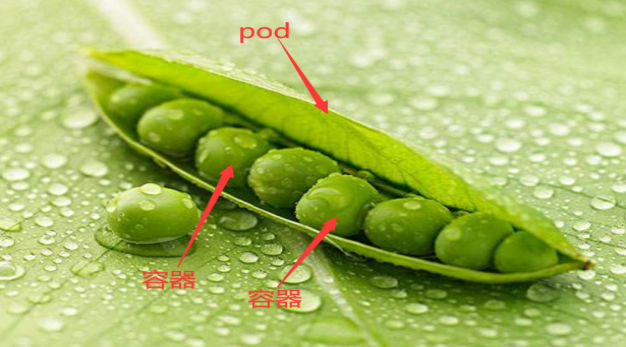
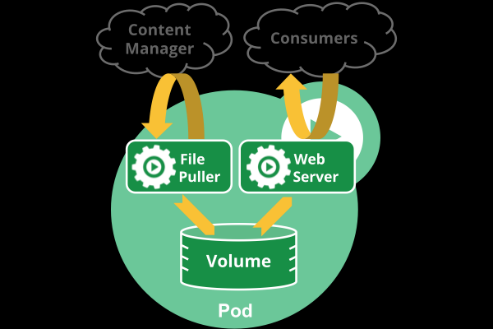
Pod 是可以在 Kubernetes 中创建和管理的、最小的可部署的计算单元。k8s是通过定义一个Pod的资源,然后在Pod里面运行容器,容器需要指定一个镜像,这样就可以用来运行具体的服务。一个Pod封装一个容器(也可以封装多个容器),Pod里的容器共享存储、网络等。也就是说,应该把整个pod看作虚拟机,然后每个容器相当于运行在虚拟机的进程。
Pod (就像在鲸鱼荚或者豌豆荚中)是一组(一个或多个) 容器; 这些容器共享存储、网络、以及怎样运行这些容器的声明。 Pod 中的内容总是并置(colocated)的并且一同调度,在共享的上下文中运行。 Pod 所建模的是特定于应用的“逻辑主机”,其中包含一个或多个应用容器, 这些容器是相对紧密的耦合在一起的。 在非云环境中,在相同的物理机或虚拟机上运行的应用类似于 在同一逻辑主机上运行的云应用。
除了应用容器,Pod 还可以包含在 Pod 启动期间运行的 Init 容器。 你也可以在集群中支持临时性容器 的情况下,为调试的目的注入临时性容器。
Pod 里面可以有一个或者多个容器,部署应用的容器可以称为主容器,在创建Pod时候,Pod 中可以有一个或多个先于主容器启动的Init容器,这个init容器就可以成为初始化容器,初始化容器一旦执行完,它从启动开始到初始化代码执行完就退出了,它不会一直存在,所以在主容器启动之前执行初始化,初始化容器可以有多个,多个初始化容器是要串行执行的,先执行初始化容器1,在执行初始化容器2等,等初始化容器执行完初始化就退出了,然后再执行主容器,主容器一退出,pod就结束了,主容器退出的时间点就是pod的结束点,它俩时间轴是一致的;
DESCRIPTION: Pod is a collection of containers that can run on a host. This resource is created by clients and scheduled onto hosts.
FIELDS: apiVersion <string> APIVersion defines the versioned schema of this representation of an object. Servers should convert recognized schemas to the latest internal value, and may reject unrecognized values. More info: https://git.k8s.io/community/contributors/devel/sig-architecture/api-conventions.md#resources
kind <string> Kind is a string value representing the REST resource this object represents. Servers may infer this from the endpoint the client submits requests to. Cannot be updated. In CamelCase. More info: https://git.k8s.io/community/contributors/devel/sig-architecture/api-conventions.md#types-kinds
metadata <Object> Standard object's metadata. More info: https://git.k8s.io/community/contributors/devel/sig-architecture/api-conventions.md#metadata
spec <Object> Specification of the desired behavior of the pod. More info: https://git.k8s.io/community/contributors/devel/sig-architecture/api-conventions.md#spec-and-status
status <Object> Most recently observed status of the pod. This data may not be up to date. Populated by the system. Read-only. More info: https://git.k8s.io/community/contributors/devel/sig-architecture/api-conventions.md#spec-and-status
# 显示所有的pod和标签 kubectl get pod --show-labels NAME READY STATUS RESTARTS AGE LABELS myapp-dep-5bc4d8cc74-cvkbc 1/1 Running 1 7d2h app=myapp-dep,pod-template-hash=5bc4d8cc74 myapp-dep-5bc4d8cc74-gmt7w 1/1 Running 2 7d2h app=myapp-dep,pod-template-hash=5bc4d8cc74 myapp-dep-5bc4d8cc74-gqhh5 1/1 Running 1 7d2h app=myapp-dep,pod-template-hash=5bc4d8cc74 ngx-dep-5c8d96d457-w6nss 1/1 Running 1 7d3h app=ngx-dep,pod-template-hash=5c8d96d457
# 使用标签选择器 kubectl get pod -l "app=ngx-dep" -L app NAME READY STATUS RESTARTS AGE LABELS ngx-dep-5c8d96d457-w6nss 1/1 Running 1 7d3h app=ngx-dep,pod-template-hash=5c8d96d457
使用标签选择器来过滤资源,需要用-l选项来指定标签选择器;
使用标签选择器查看app!=ngx-dep的pod
1
2
3
4
5
6
7
8
9
10
11
12
13
14
# 显示所有的pod和标签
kubectl get pod --show-labels
NAME                         READY   STATUS    RESTARTS   AGE    LABELS
myapp-dep-5bc4d8cc74-cvkbc   1/1     Running   1          7d2h   app=myapp-dep,pod-template-hash=5bc4d8cc74
myapp-dep-5bc4d8cc74-gmt7w   1/1     Running   2          7d2h   app=myapp-dep,pod-template-hash=5bc4d8cc74
myapp-dep-5bc4d8cc74-gqhh5   1/1     Running   1          7d2h   app=myapp-dep,pod-template-hash=5bc4d8cc74
ngx-dep-5c8d96d457-w6nss     1/1     Running   1          7d3h   app=ngx-dep,pod-template-hash=5c8d96d457

# 使用标签选择器
kubectl get pod -l "app!=ngx-dep" -L app
NAME                         READY   STATUS    RESTARTS   AGE    LABELS
myapp-dep-5bc4d8cc74-cvkbc   1/1     Running   1          7d2h   app=myapp-dep,pod-template-hash=5bc4d8cc74
myapp-dep-5bc4d8cc74-gmt7w   1/1     Running   2          7d2h   app=myapp-dep,pod-template-hash=5bc4d8cc74
myapp-dep-5bc4d8cc74-gqhh5   1/1     Running   1          7d2h   app=myapp-dep,pod-template-hash=5bc4d8cc74
每个 Pod 都在每个地址族中获得一个唯一的 IP 地址。 Pod 中的每个容器共享网络名字空间,包括 IP 地址和网络端口。 Pod 内 的容器可以使用 localhost 互相通信。 当 Pod 中的容器与 Pod 之外 的实体通信时,它们必须协调如何使用共享的网络资源 (例如端口)。
在同一个 Pod 内,所有容器共享一个 IP 地址和端口空间,并且可以通过 localhost 发现对方。 他们也能通过如 SystemV 信号量或 POSIX 共享内存这类标准的进程间通信方式互相通信。 不同 Pod 中的容器的 IP 地址互不相同,没有 特殊配置 就不能使用 IPC 进行通信。 如果某容器希望与运行于其他 Pod 中的容器通信,可以通过 IP 联网的方式实现。
Pod 中的容器所看到的系统主机名与为 Pod 配置的 name 属性值相同。 网络部分提供了更多有关此内容的信息。